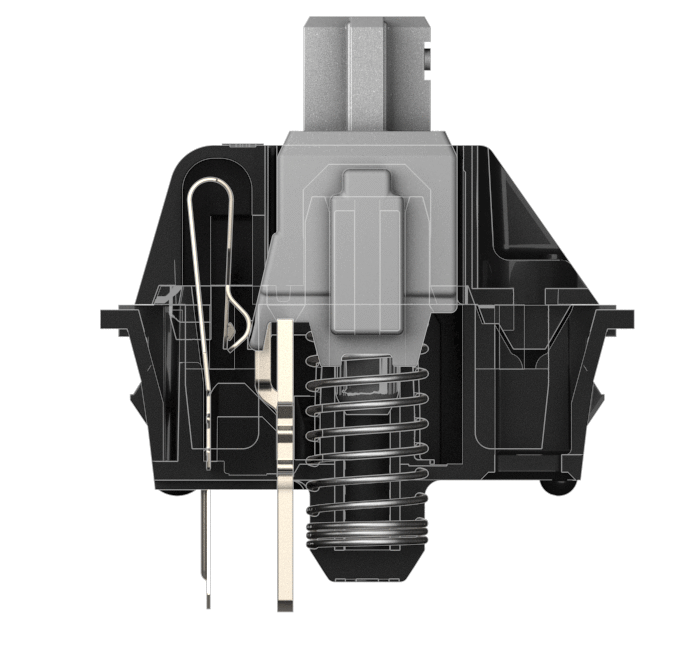
The Essential Guide to Keyboards: Mistakes, Misconceptions and What Really Matters
This post was supposed to be one of the first on my site. I kept on postponing it because I simply couldn’t find the best keyboard. What changed my mind in the end is that I resigned from the saga of finding the best keyboard, it doesn’t exist yet — and I’m not talking about my taste. Nonetheless, there are many good ones, and discerning them from the bad or deceitful is not an easy task, something I’ve painfully learned from experience.
Most people would say “whatever” to keyboards and just use the respective “whatever” plastic crap we receive as the standard in offices. While these generic devices are fine, you’re missing out on a much more pleasant experience if you ignore the quality side of the market. Besides that argument, keyboards are the main tool of today’s workers: just like a pianist would rather play on the best piano, I believe you wouldn’t want to type on crappy keyboards if you had the choice.
Without further ado, let’s take a look at the major criteria for choosing a keyboard — believe me, if you don’t follow something similar to this ranking order, you will suffer: sound is not at all the most important factor — :
- Key Stroke Force
- Key Stroke Travel Distance
- Tactility or Abruptness
- Sound
- Keycap Quality
- Chassi Build
- Backlighting
As some extra features I would include:
- Wireless
- Layout
- Customizability
- Keycap Shape
If you want to learn from a person with more expertise than I, look no further than Chyrosran22, someone with decades of experience collecting rare keyboards and reviewing them. His content overshadows everything I’ve found on Youtube, and the internet in general, by a lot.
Disclaimer What is the aim of this guide? My intention is to build a comprehensive logical reasoning on which the reader can develop his or her own opinions. I do not intend to endorse any products at all, the ones I cite will only serve as examples. After reading this post, hopefully, the reader will be able to research for his or herself safely without falling into the various marketing traps.
Mechanical Keyboards are nothing new. The first commercial models came
out in the late 1980’s and were just another option. Not even that
actually. They were beaten to dust by IBM’s Model F and Model
M
So why is there such a big craze for mechanical keyboards nowadays? Mostly, after months of research and many keyboards of experience, I would say it’s at least 80% due to marketing. Since the 1990’s, the keyboard industry has had no differential to profit on, everything was made from cheap plastic and was mostly generic; now, with different mechanical switches, they’ve created not one but many different options — including ways of making yourself heard when typing from more than 30 meters (literally) —, something that certainly catches the eye of many consumers. Now, do these mechanical species really improve the user experience? Questionable.
It is true, though, that there are some pros about the mechs. The huge amount of variations with respect to sound and key stroke force, for example, will probably make the user able to find its perfect match — albeit after an equivalently extensive research. All in all, mechs are valid products, just be mindful of their overhyped status.
You absolutely need to check for these features when buying a new keyboard: don’t be enthralled by their flashy lights and tattoos.
The graph below shows the key stroke force (grams)
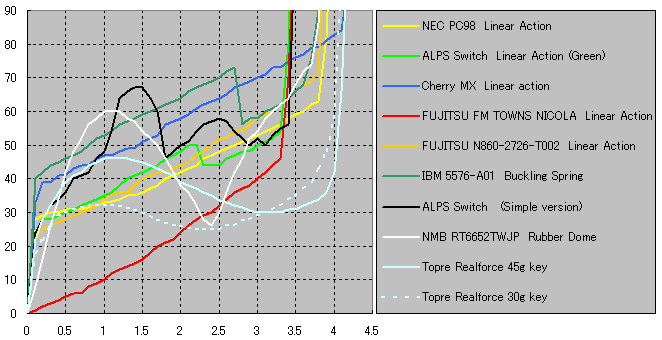
Many preferences exist, however, most people would rather have tactile keyboards due to the physical feedback they give us, which not only is usually pleasant, but helps knowing if we are typing correctly or if the hardware is working well. This feedback is also probably why mechanical keyboards became so prominent with gamers: without it, gaming can be quite an unpleasant experience.
Selecting the best curve is the difficult part and will inevitably
vary a lot individually. I can assure you it can become quite the
rabbit hole, since no external opinion will guarantee a good
experience. For me, personally, for example, a short travel distance
with very low key stroke force is the best choice. Right now, I’m
using a
Logitech K780
which feels a lot like a laptop keyboard. Laptop keyboards are
sometimes despised by the keyboard enthusiasts community who think the
short key travel (< 1.5 mm) is very unpleasant. I, on the other
hand, have the opposite feeling; keyboards like the
Topre Realforce 45g
My advice for those who want to look for better options is to first examine all of the characteristics of a keyboard you’ve already experienced, otherwise the search space will be overwhelming. Some manufacturers have started to offer numpad-like switch testers, however, they are mostly useless because the user will have no way of grasping the whole keyboard experience by pressing only one key, so beware of this new marketing trap. Also, on a sidenote, do not fall for the other marketing trap of believing Cherry MXs are the best switches ever, they are kind of generic and, in terms of quality, will never ever beat old school magnetic ones.
Switches are the biggest part of the fun — and of the rabbit hole — when researching about mechanical keyboards. If you wish to continue researching on your own, some valuable initial extra resources are: the Cherry MX Specifications official page; and the Mechanical Keyboards Guide to different switches.
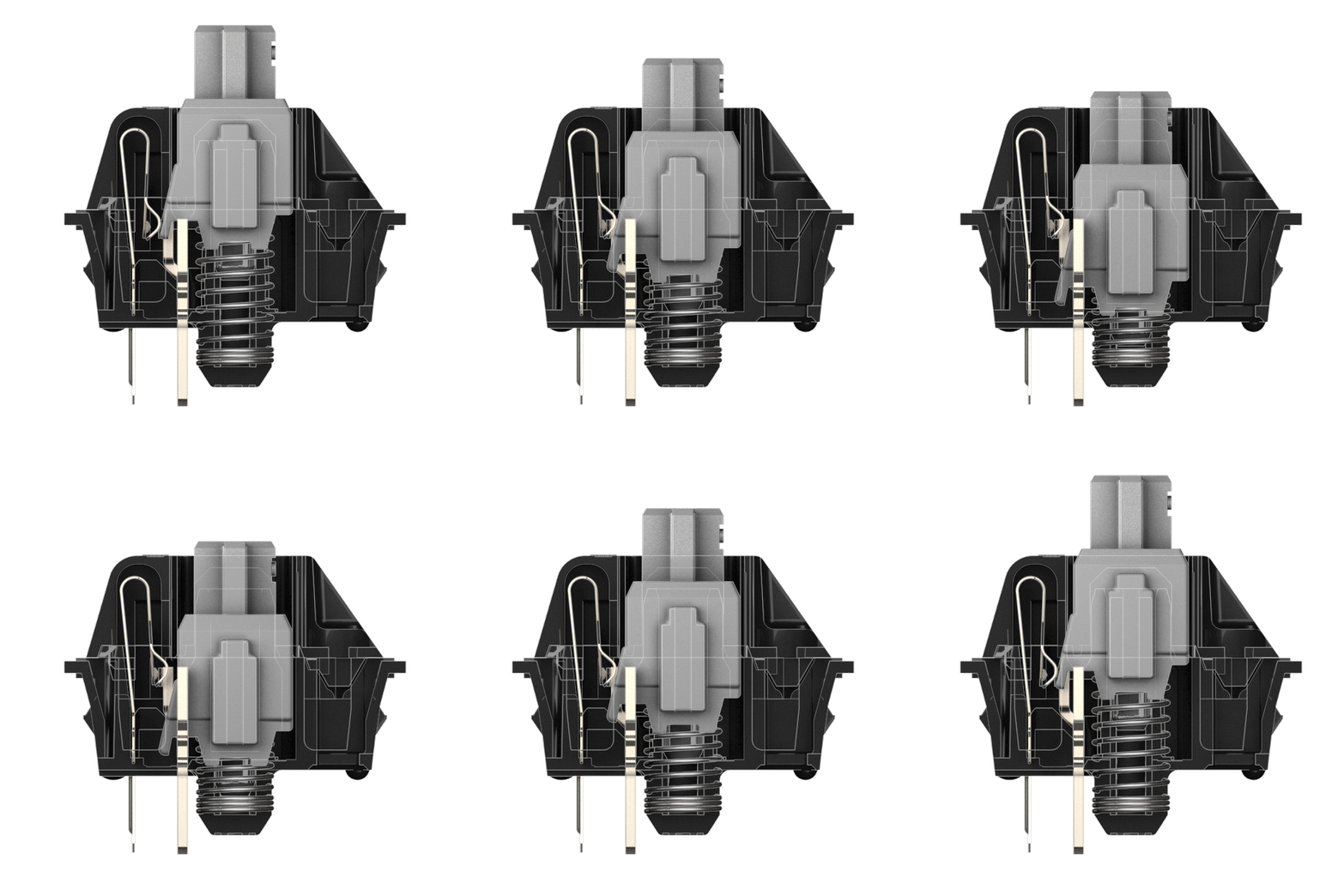
Please: don’t be an asshole. Unless you’re alone on an island, don’t buy Cherry MX Blue switches. Back in the 1980’s, when people were used to ultra noisy rooms full of frenzied typists, that would be ok. But now, in an office filled with people furiously thinking about more and more complex problems, why pollute the ambiance with a billion clicks? I wouldn’t even advise it for gaming, it’s annoying too — aren’t the visual and tactile feedbacks enough? — some lan houses feel like 20th century phone operator cabins filled with relays, which have been said to drive workers to insanity.
Nowadays, the hype for the Cherry MX Blues has diminished a bit, after
their obvious side effects. But people still seem to not care much
about the other human beings in the room. It is true that some of the
muted keyboards have a mushy unpleasant
You will not realize the importance of it until you experience better keycaps. Most commodity keyboards use ABS plastic keycaps, a cheap plastic material that gets greasy very easily and has a glossy look; while the quality side of the market tends to use PBT plastic keycaps, which has a mate look and a more rugged surface, something that also provides for an extra, pleasant, (literally now) tactile feedback. When I transitioned from a Razer Black Widow Stealth to a Topre Realforce 45g, keycaps were in fact my biggest surprise and not the key stroke feel, this alone was about 80% of the whole quality appeal the Realforce keyboard created in me. After my experience with PBTs, typing on my Macbook Air 2013 — which was either great or ok for 5 years — feels incredibly cheap and crappy.
There are also other variants of these two basic materials. For
example, the Logitech K780 seems to use some sort of improved ABS
which is not that bad, way better than my Macbook Air 2013. Great
places to buy quality keycaps are
Massdrop,
Mechanical Keyboards
and wasdkeyboards, but
Aliexpress
has nice (and risky) options sometimes — you can also find
customized keycaps
This was one of the major reasons I chose to get rid of my commodity keyboard. The biggest symptoms you should look for are: flex and weight of the chassi. Flexing is very common with cheaper boards; being made only from plastic, they will contract with pressure, and the location of the keys will move, which can be very annoying when typing. Lightweight chassis can also cause the same problem because, with each stroke, the user will inevitably push the keyboard somewhere else.
What I recommend is to look for a chassi with a steel plate backbone — which is also used to protect the internal PCB. Having this plate can often solve both problems at the same time, since it reduces flexing and weighs a lot. In the end, 0.9-1.5 kg of weight is usually a good indicator that the manufacturer paid attention to this criterion.
In truth, I would say this should be in the Extra Features section, but, since so many people are now gamers, I’m giving it a little bit more importance. Most people, though, will buy backlit keyboards without even knowing why it’s a useful perk and not only a way of getting attention.
The reason is that, when gaming, usually the room lights are off in
order to improve the cinematic experience and, thus, if you want to
know where a key is, you won’t be able to find it easily by looking at
the keyboard. Backlighting, then, comes in handy, though one could
argue that knowing how to touch type is probably more
effective
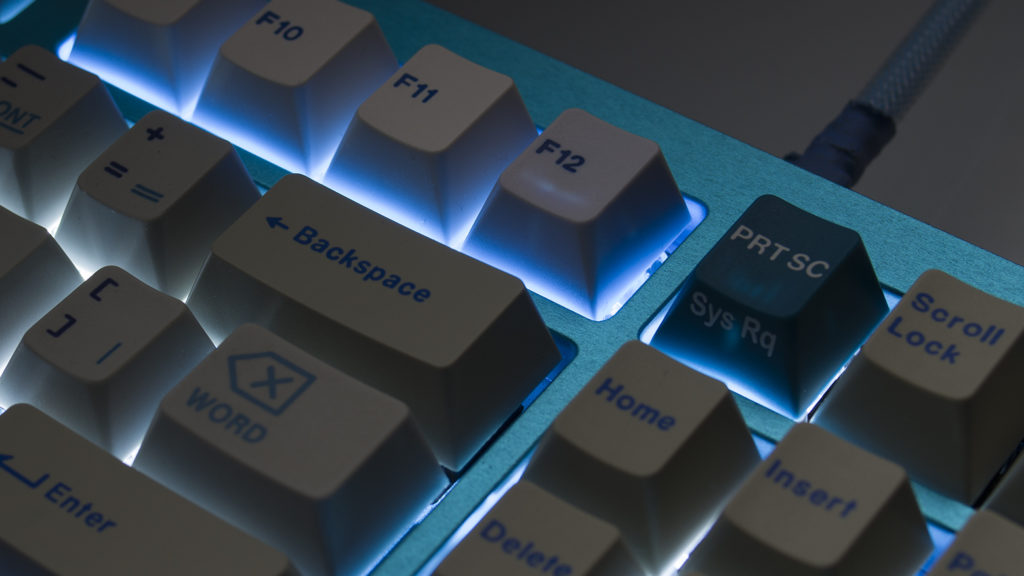
However, be careful when choosing a keyboard with backlighting, just because it exists doesn’t mean it is going to help. Take a look at the image below, do you see anything wrong? First of all, the letterings are not transparent, so what’s the point of backlighting? The user won’t be able to distinguish what the function of the key is in that case, and, besides that, we have a severe backlight leakage case here. When leakage happens, we see the light coming out from around the keycaps, which will create a more or less homogeneous light from the user’s point of view, making the backlight perk completely useless since it’s gonna be difficult to distinguish the letterings.
Unless it’s a matter of life and death, do not prioritize these features.
I think this is only very important when you need to carry the
keyboard to many places
That said, I’m not here to condone manufacturers for not investing in wireless technology for keyboards. At this point, it’s incredibly shameful of them that the vast majority of all quality keyboards are not wireless, the technology necessary to achieve it has been created more than 20 years ago at least.
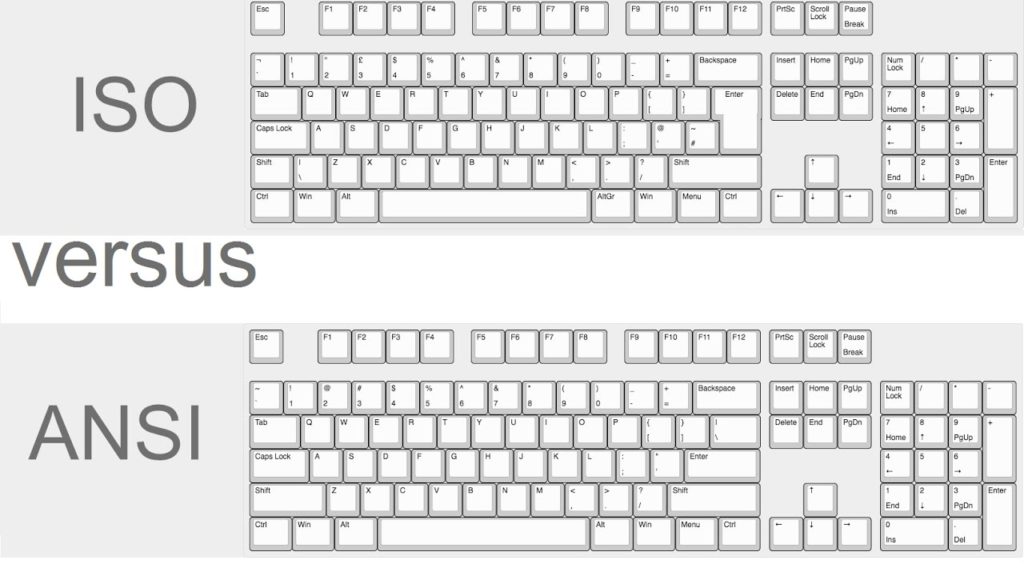
For most people, this is actually very important, but I chose to put it in the extra features because, unless you prefer a foreign layout, it won’t be a problem, just stick to your country’s layout and it should be fine. In my case, I’ve used the Macbook Air 2013 ANSI layout so much that it’s difficult to type on the Brazilian ISO layout sometimes.
That said, there are two main choices here: the ANSI and the ISO
layouts. The biggest difference comes with the enter key and its
peripherical punctuation keys. For coders, these differences can be
quite annoying. Especially considering that each country has its own
ISO variation
Nowadays, most manufacturers are paying more attention to this criterion, something that was widely disregarded 10 years ago. Many famous brands now have software to customize the layout and add new macros. However, you can always go deeper and program it for yourself from the ground up, though it is for sure another rabbit hole. If you want an example of ultimate keyboard programming experience, check out this “tutorial” from Linus Tech Tips’s channel.
For simpler solutions, besides the proprietary software, there are
some generic options: for windows,
KeyTweak
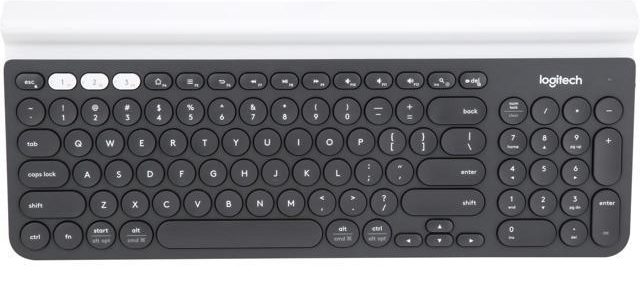
In case you’ve never seen a picture of the Logitech K780, it has round keycaps. Quite frankly, it looks ugly, perhaps an abomination. However, it also resembles old mechanical typing machines. That’s purely a coincidence I believe, because the rounded keycaps were actually chosen due to research: the bigger spaces between the keys creates less room for typing mistakes: accuracy improves, on average, at least 20%. After using it for months I do agree with that assertion and also recommend this keycap shape.
My summary of everything about the keyboard world, after having learned the basic technical stuff and plenty of minutia, is that it is all about personal preferences. The enthusiast community will try to push you a certain perception, the market, another and, yet, the individual will not be satisfied unless he breaks the chains and looks out for himself.
Update on April 2021: I've been using the RealForce Topre 55g for about a semester, and I don't think I'm going back. Logitech's layout is extremely annoying on the F and arrow keys; and being dependent on software for handling your keyboard is very unnecessary, a marketing coup on the customer's independence. It's a very good keyboard overall, though.